Updated ·
Start with a purpose, not a whole catalogue
For a language session, make a list with one short explanation, two listening examples and a longer conversation. Add their public video links through Add a link. These can come from different creators. Rename the list so its purpose is recognisable next week. A small intentional queue is easier to check than a complete channel archive.
For a continuing series, choose an appropriate order and use Only unwatched when you want to move forward. For revision, show watched items again and enable whole-queue repeat. Check the visible queue before starting: filters can hide items without removing them from the saved list.
Choose the right import method
A native YouTube playlist remains inside YouTube’s player. Use it when the creator already maintains the selection you want. Add individual videos to a Rondli queue when you need your own order, filters or mixed creators.
Recent channel import uses the public source available to Rondli. That source often contains only 15 recent entries; Rondli does not claim this is the complete archive. Play all uploads opens the channel’s uploads playlist. A complete editable archive requires an active API connection. If an essential lesson is missing, add its direct link and verify the import result rather than relying on the channel total.
Make a backup before changing browsers
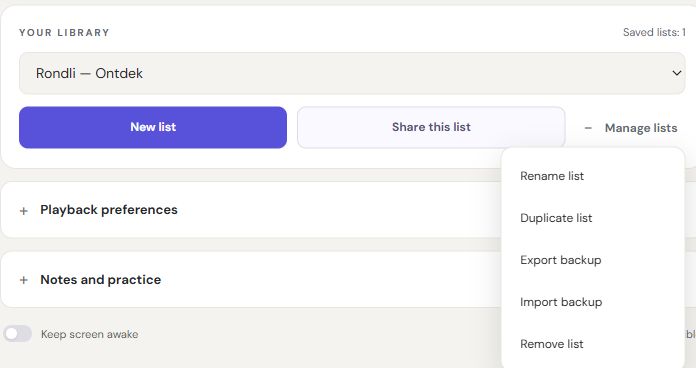
- Open Library and the list-management menu.
- Export a backup and keep the downloaded JSON file somewhere you can find it.
- On the destination browser, open Rondli and import that file.
- Check the imported list names and saved state before continuing.
Import adds copies and preserves existing lists. Browser storage can be cleared by privacy settings, private browsing or removing site data. A backup is the practical safeguard before those changes. The file contains your library data, so treat it as private.
Share a selection or synchronise privately
Share this list creates a snapshot containing the list name, video identifiers and format labels, or a playlist identifier. Anyone with the link can open that selection for 30 days. Your later edits do not update the snapshot; your watch position and history are not included.
Device pairing serves a different purpose. It encrypts the library in your browser and lets you synchronise it on request. Pause playback before synchronising; conflicting edits are retained as separate copies. Anyone with the pairing code can read and change the synchronised library, so never post it publicly. Unused connections expire after 90 days. Pairing is not casting or a remote control.