Updated ·
Choose a passage you can actually practise
Start a public video that permits embedded playback. For language listening, choose a spoken sentence you want to hear again; for music, choose a short passage. Listen once normally before setting boundaries. A section should include enough context to understand it, rather than cutting off the first or last sound.
Rondli controls the YouTube player; it does not analyse speech, provide transcripts or guarantee frame-perfect looping. Buffering and player timing may affect the boundary. Keep the page visible and your device online.
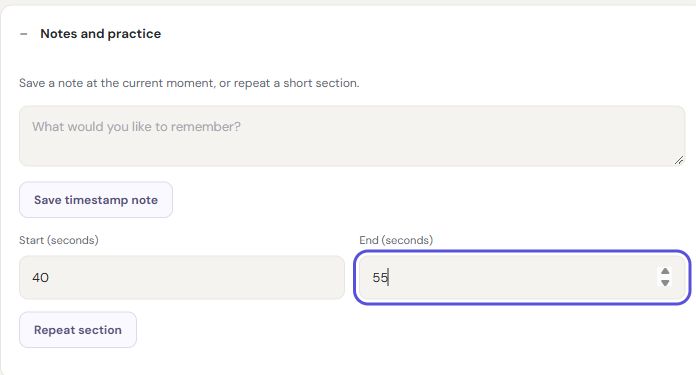
Repeat from 40 to 55 seconds
- Open Notes and practice under the player.
- Enter 40 as the start and 55 as the end; the fields use seconds.
- Choose Repeat section and start playback if the browser requests a click.
- Listen several times, then stop section repeat to return to normal playback.
For a passage starting at 1:20, enter 80 seconds. The end must be later than the start and belong to the same video. Start with a short interval, then widen it if words or notes are cut off. The example times illustrate the controls; choose a passage suitable for your own video.
Leave a useful timestamp note
Pause at the moment you want to remember, write a brief note and save it. For example, write “listen for the final consonant” instead of copying an entire transcript. A timestamp note helps you return to the moment that matters during a later visit.
Keep separate lists for separate practice goals so notes remain understandable. Export a backup before clearing browser data or changing browsers. Sharing a public list should not be treated as a private notebook transfer; use a backup or private pairing for your library.
When the practice session does not behave as expected
If the same passage keeps repeating, stop section repeat before testing whole-queue repeat. If no sound starts, click the player and check device volume. If the video cannot be embedded, open it on YouTube or choose another permitted example.
If playback pauses on mobile, keep the browser visible and check power-saving or screen-lock behaviour. PWA installation does not guarantee background playback. If the page appears empty after a browser change, return to the original browser and export its library; do not clear its data while looking for your notes.